
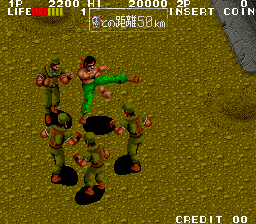
Ikari Three - The Rescue (Japan, Rotary Joystick)
Ikari Three - The Rescue was released in 1991 by Technos Japan. This arcade game is a thrilling continuation of the Ikari Warriors series. In this game, players take on the role of a fearless commando who must carry out a daring rescue mission. The game is set in a war - torn landscape filled with various enemies, including infantry, tanks, and helicopters. The unique feature of this version is the support for a rotary joystick, which provides a more immersive and precise control experience compared to traditional joysticks. The graphics of Ikari Three - The Rescue are typical of the arcade games of the early 1990s, with detailed sprites and colorful backgrounds. The gameplay is fast - paced, and players need to use a combination of shooting and movement skills to progress through the levels. There are multiple stages in the game, each with its own set of challenges and bosses. As players advance, they can collect power - ups such as new weapons and extra lives to enhance their chances

The emulator loads after you press Start Game.
How to Play Ikari Three - The Rescue (Japan, Rotary Joystick)
Save & Load States
- F2Press F2 to save your current game state at any time.
- F4Press F4 to load your last saved state.
- F3Use F3 to switch between save slots.
Save states are stored locally in your browser. They persist across sessions but are cleared if you clear browser data.
Customize Controls
Click the gear icon on the emulator toolbar → "Controls" to remap keys.
Default layout for ARCADE. Remap in emulator settings.
About Ikari Three - The Rescue (Japan, Rotary Joystick)
Ikari Three - The Rescue (Japan, Rotary Joystick) is a classic ARCADE game you can play online for free in your browser. No download or installation is required — click "Play Now" to start instantly. Relive the experience of vintage console gaming with authentic gameplay, right in your browser on any device.
This title is part of the PLAYERETRO game collection, which features over 1000 classic titles across multiple systems. Use the keyboard controls shown above to move and interact. Save your progress with save states and enjoy Ikari Three - The Rescue (Japan, Rotary Joystick) anytime, anywhere.
Ikari Three - The Rescue, released in 1991 by Technos Japan, is an arcade game with support for a rotary joystick. Players take on a rescue mission in a war - torn landscape, facing various enemies an