
Canvas Croquis
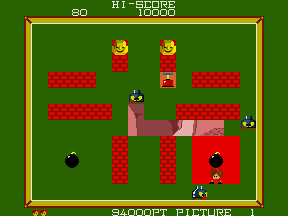
First released in 1985 by legendary Japanese arcade publisher Jaleco, Canvas Croquis is a delightfully unique creative arcade title that broke the mold of mid-1980s arcade game design. At a time when most arcade cabinets were dominated by fast-paced shooters, beat ‘em ups, and platformers that demanded quick reflexes and competitive high-score chasing, Canvas Croquis offered a low-stakes, creative experience that appealed to both core arcade fans and casual visitors who preferred more relaxed gameplay. The core loop is simple but deeply engaging: each level presents players with a clear reference image, ranging from cute animals and everyday household objects to stylized character portraits, and gives you a strict time limit to trace the image as accurately as possible using the cabinet’s analog joystick-controlled digital brush. Once the timer expires, an in-game judge evaluates your work across three metrics: outline accuracy, line smoothness, and detail completeness, assigning a fin

The emulator loads after you press Start Game.
How to Play Canvas Croquis
Save & Load States
- F2Press F2 to save your current game state at any time.
- F4Press F4 to load your last saved state.
- F3Use F3 to switch between save slots.
Save states are stored locally in your browser. They persist across sessions but are cleared if you clear browser data.
Customize Controls
Click the gear icon on the emulator toolbar → "Controls" to remap keys.
Default layout for ARCADE. Remap in emulator settings.
About Canvas Croquis
Canvas Croquis is a classic ARCADE game you can play online for free in your browser. No download or installation is required — click "Play Now" to start instantly. Relive the experience of vintage console gaming with authentic gameplay, right in your browser on any device.
This title is part of the PLAYERETRO game collection, which features over 1000 classic titles across multiple systems. Use the keyboard controls shown above to move and interact. Save your progress with save states and enjoy Canvas Croquis anytime, anywhere.
Play Canvas Croquis, the unique 1985 Jaleco creative arcade game, online for free on PLAYERETRO. Trace sketches, earn high scores, and enjoy this family-friendly vintage 80s arcade title.