
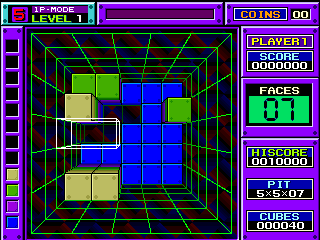
Block Out (set 2)
First rolled out to arcade cabinets worldwide in 1989 as a tuned, improved variant of the original 3D puzzle hit Block Out, Block Out (set 2) is published by Electronic Arts and developed by California Dreams, quickly becoming a fan favorite among late 80s arcade puzzle enthusiasts. Unlike traditional 2D tile-matching puzzle games of the era, Block Out (set 2) places players in a top-down view of a 10x10x20 3D well, tasking them with rotating, positioning, and dropping polycube 3D pieces to fill complete horizontal layers, which are then cleared to free up space and earn points. The set 2 variant differentiates itself from the original arcade release with a rebalanced difficulty curve, fixing the original’s overly steep difficulty spike in levels 5 to 8, patching rare collision detection bugs that caused pieces to clip through filled layers unexpectedly, and adding 3 extra high-score leaderboard slots for local arcade venues. It also supports the same iconic 2-player competitive mode a

The emulator loads after you press Start Game.
How to Play Block Out (set 2)
Save & Load States
- F2Press F2 to save your current game state at any time.
- F4Press F4 to load your last saved state.
- F3Use F3 to switch between save slots.
Save states are stored locally in your browser. They persist across sessions but are cleared if you clear browser data.
Customize Controls
Click the gear icon on the emulator toolbar → "Controls" to remap keys.
Default layout for ARCADE. Remap in emulator settings.
About Block Out (set 2)
Block Out (set 2) is a classic ARCADE game you can play online for free in your browser. No download or installation is required — click "Play Now" to start instantly. Relive the experience of vintage console gaming with authentic gameplay, right in your browser on any device.
This title is part of the PLAYERETRO game collection, which features over 1000 classic titles across multiple systems. Use the keyboard controls shown above to move and interact. Save your progress with save states and enjoy Block Out (set 2) anytime, anywhere.
Play Block Out (set 2), the polished 1989 3D puzzle arcade game, for free online on PLAYERETRO. Enjoy the rebalanced, bug-fixed definitive version of classic Block Out with single and competitive 2-pl