
Tecmo World Cup Soccer (Japan)
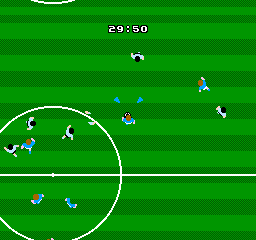
Tecmo World Cup Soccer (Japan) is a classic football game released for the FC-NES. It offers an exciting soccer experience. This game was brought to life by Tecmo. In this title, players can immerse themselves in the world of international soccer. The game features various national teams, each with its own unique set of players. You can take control of your favorite team and compete in intense matches. The graphics, while simple by modern standards, still manage to convey the essence of the beautiful game. The controls are intuitive, allowing you to pass, shoot, and defend with ease. Whether you're a seasoned soccer fan or just looking for a fun retro gaming experience, Tecmo World Cup Soccer (Japan) on the FC-NES has something to offer.

The emulator loads after you press Start Game.
How to Play Tecmo World Cup Soccer (Japan)
Save & Load States
- F2Press F2 to save your current game state at any time.
- F4Press F4 to load your last saved state.
- F3Use F3 to switch between save slots.
Save states are stored locally in your browser. They persist across sessions but are cleared if you clear browser data.
Customize Controls
Click the gear icon on the emulator toolbar → "Controls" to remap keys.
Default layout for FC-NES. Remap in emulator settings.
About Tecmo World Cup Soccer (Japan)
Tecmo World Cup Soccer (Japan) is a classic FC-NES game you can play online for free in your browser. No download or installation is required — click "Play Now" to start instantly. Relive the experience of vintage console gaming with authentic gameplay, right in your browser on any device.
This title is part of the PLAYERETRO game collection, which features over 1000 classic titles across multiple systems. Use the keyboard controls shown above to move and interact. Save your progress with save states and enjoy Tecmo World Cup Soccer (Japan) anytime, anywhere.
Play Tecmo World Cup Soccer (Japan) on FC-NES! Experience classic soccer gaming with intuitive controls and various national teams.