
Snap Kids (Japan)
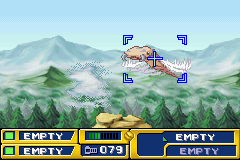
Released exclusively for the Game Boy Advance in Japan in 2001 by Nintendo, Snap Kids is a charming, kid-focused puzzle-adventure game that blends open exploration with creative photography-based gameplay. Designed specifically for younger players to suit the GBA’s portable, accessible nature, the game casts you as an aspiring young photographer exploring a series of vibrant, whimsical themed worlds, from sunny city parks to quiet forest trails and bustling town squares. Your core goal is to complete a list of photography assignments given by local characters, snapping clear photos of specific objects, animals, and landmarks to progress and unlock new areas to explore. Unlike many fast-paced GBA action titles, Snap Kids prioritizes relaxed exploration and observation, making it a great casual pick for players of all ages. As a Japan-exclusive release, it has become a cult hidden gem among retro GBA collectors and enthusiasts, with its bright, cheerful pixel art that leverages the GBA’s

The emulator loads after you press Start Game.
How to Play Snap Kids (Japan)
Save & Load States
- F2Press F2 to save your current game state at any time.
- F4Press F4 to load your last saved state.
- F3Use F3 to switch between save slots.
Save states are stored locally in your browser. They persist across sessions but are cleared if you clear browser data.
Customize Controls
Click the gear icon on the emulator toolbar → "Controls" to remap keys.
Default layout for GBA. Remap in emulator settings.
About Snap Kids (Japan)
Snap Kids (Japan) is a classic GBA game you can play online for free in your browser. No download or installation is required — click "Play Now" to start instantly. Relive the experience of vintage console gaming with authentic gameplay, right in your browser on any device.
This title is part of the PLAYERETRO game collection, which features over 1000 classic titles across multiple systems. Use the keyboard controls shown above to move and interact. Save your progress with save states and enjoy Snap Kids (Japan) anytime, anywhere.
Play Snap Kids (Japan) online for free on PLAYERETRO. This 2001 Japan-exclusive Nintendo GBA title is a charming casual photography puzzle-adventure perfect for retro gaming fans. Explore vibrant worl